

 Member sign in
Provider Resources and Support
If your patient’s ID card includes the Collective Health logo, you’re in the right place. This is your resource hub, where you can check eligibility, submit claims, and access support.
Sign in to Availity Essentials™

We have cleared the majority of our backlog so new claims submitted should process within our standard claim processing timeframes. Payments for delayed claims will continue to be issued as quickly as possible.
We are currently experiencing higher than normal call volumes.
Prior authorization through EviCore (PT/OT) and Carelon (advanced imaging) is no longer required following the transition to Providence Health Plan powered by Collective Health.
This is the exclusive partnership between Providence Health Plan and Collective Health, serving as the new third-party administrator (TPA) for Providence Health Plan’s ASO/self-funded business, effective September 1, 2025.
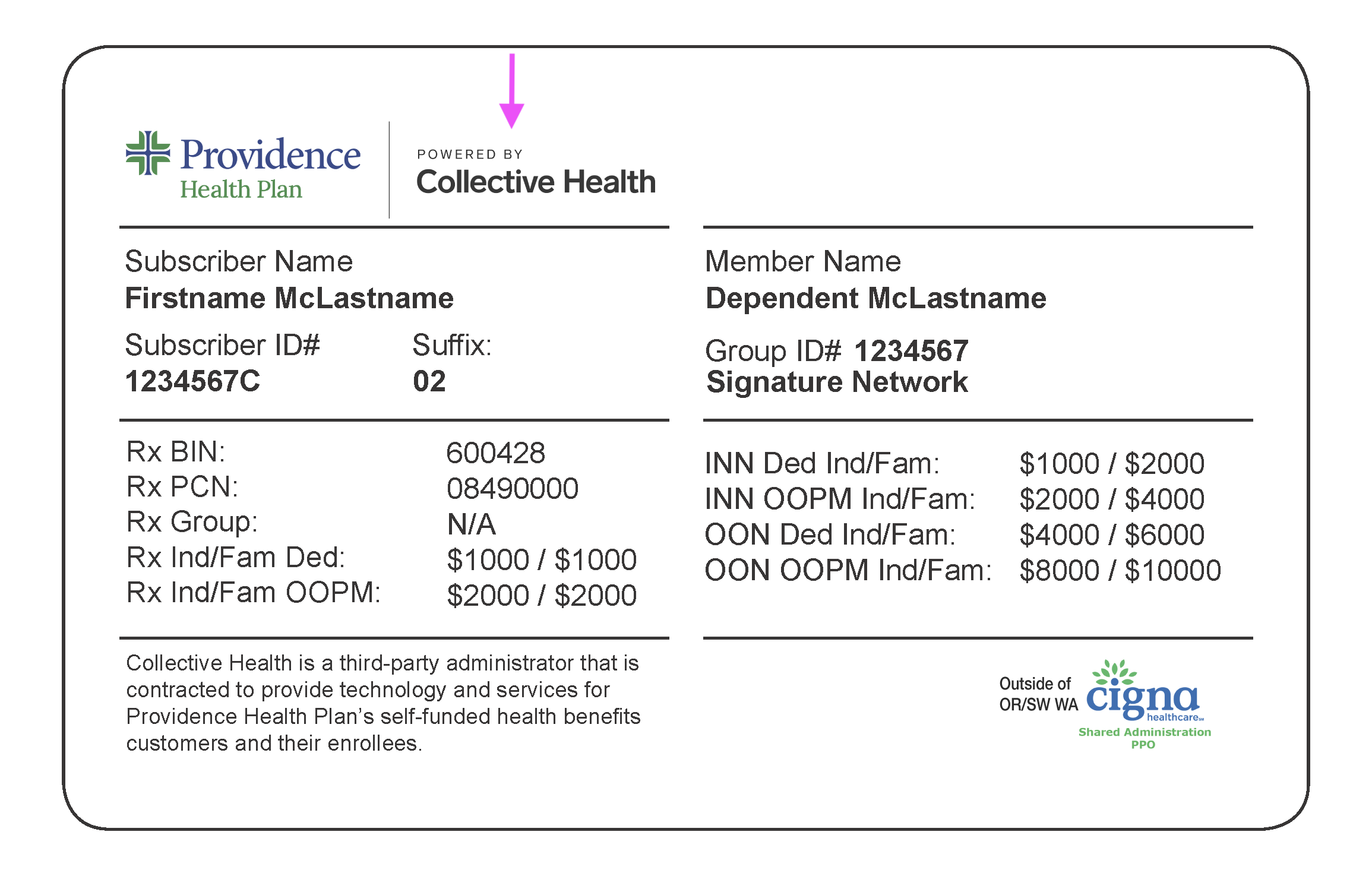
This change is continuing to roll out by employer group, so it is essential to check the member’s most current ID card to verify their plan and see if the “Providence Health Plan Powered by Collective Health” logo is there.
For a full set of resources and our comprehensive Provider Support Manual, please visit the Availity Essentials™ Portal.
Availity Essentials™ Portal
Am I in-network with Collective Health?
Collective Health is a Third-Party Administrator (TPA) and does not manage provider contracting or networks.
For services rendered within Providence Health Plan’s service area, providers must be contracted with the Providence Health Plan network listed on the member’s ID card. Some plans may also allow access to providers contracted with First Choice Health Network, as indicated on the member’s ID card.
For services rendered outside Providence Health Plan’s service area, providers must be contracted with the wrap network listed on the member’s medical ID card.
Providers who are unsure of their network participation status or are interested in joining a Providence Health Plan network should visit the Providence Health Plan provider website for guidance and next steps.
What are a member’s rights and responsibilities?
Providence Health Plan encourages members to understand what they can expect from their health plan and how to use their benefits effectively. To understand member rights and responsibilities, click here.
Visit Availity Essentials™ to check eligibility and benefits. Remember to search for the Providence Health Plan Powered by Collective Health payer in the menu. For a detailed guide about how to use the Eligibility and Benefits Inquiry application in Availity Essentials™, see our Provider Support Manual.
Please note:
- DO NOT use the ProvLink portal (phpprovider.providence.org) for these members
- ProvLink remains in place only for other Providence Health Plan members (e.g., fully-insured, Medicare)
- Always check the member ID card first to determine which payer to use
Am I able to confirm coverage for specific procedure codes?
While this functionality is not currently available in Availity Essentials, it is coming soon, including a self-service IVR option.
Am I able to confirm coverage for specific procedure codes?
Yes, providers have the option to search by specific CPT/HCPCS procedure codes on Availity’s Eligibility & Benefits inquiry. The response will be filtered to show the applicable benefits.
Where do I send claims?
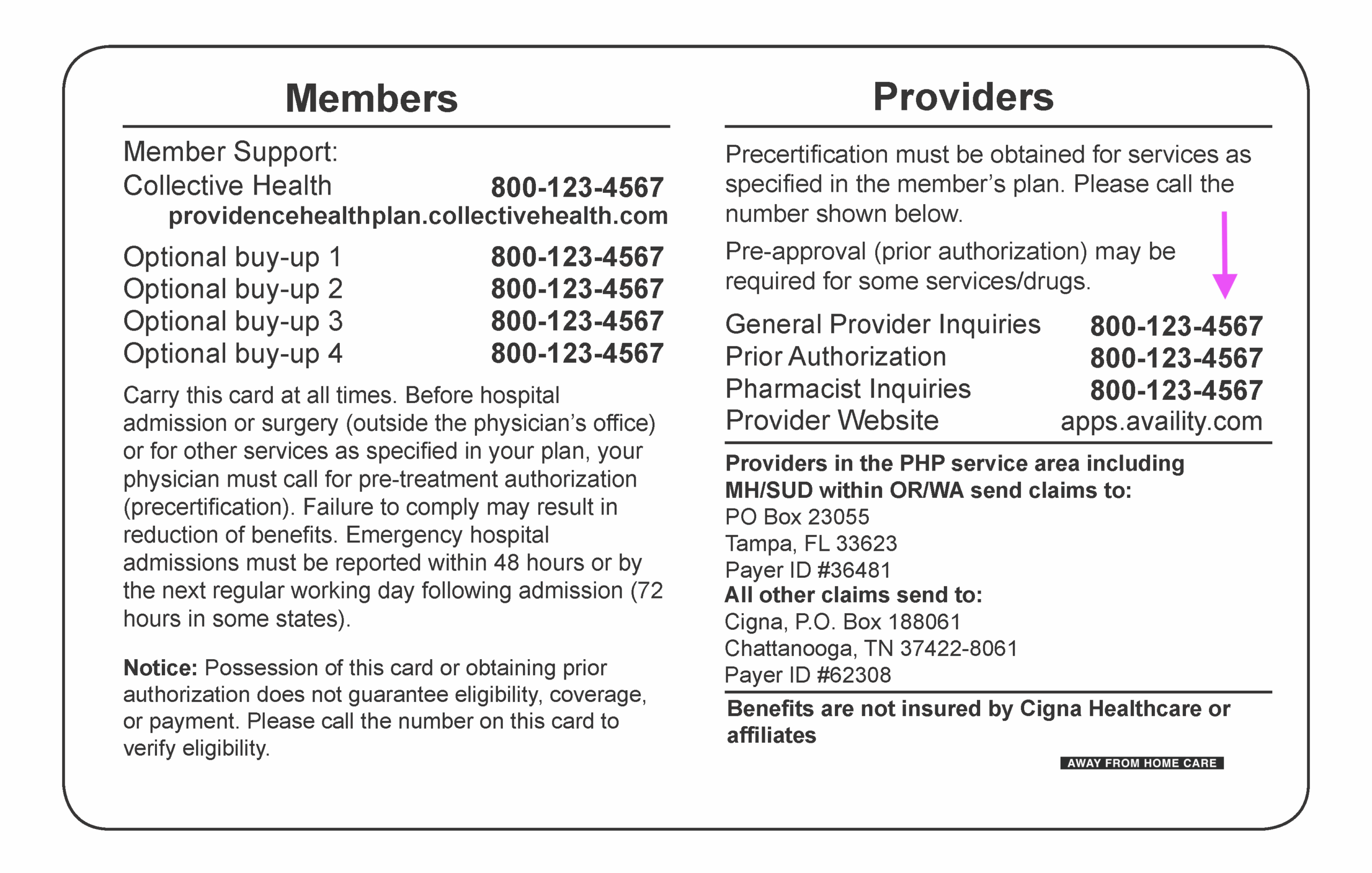
This information can be found on the back of the member’s ID card—please reference it for the most accurate instructions. Submit claims digitally via Availity Essentials or Optum, or submit via mail.
For detailed guidance on submitting claims, please refer to the Provider Support Manual for a full list of payer IDs and instructions for members with out-of-area coverage through Cigna, First Health, or First Choice Health Network.
IMPORTANT: Submit digital claims for Providence Health Plan Powered by Collective Health members via Availity Essentials™ or your existing clearinghouse connection to Optum, using Optum Payer ID: 36481.
Availity Essentials™ Portal
Submit paper claims on a standard Professional services: CMS-1500 or Institutional services: UB-04 form with all required fields and send to this address:
Collective Health
PO Box 23055
Tampa, FL 33623
Should I use a 9 or 11 digit ID?
Claims can be submitted using either a 9 digit or 11 digit ID with suffix. You can find this ID on a member’s ID card. Please ensure as well that the member’s ID card includes “Powered by Collective Health“.
How can I see the status of my claim?
You can find this information in Availity Essentials by going to Claims & Payments, then Claim Status. Not seeing what you’re looking for? Confirm that you’ve sent the claim to the correct location and used the most up-to-date member ID.
I have a member who is dually covered by Providence Health Plan Powered by Collective Health, do I need to submit claims twice?
Yes. If a member has dual coverage, you must follow standard Coordination of Benefits (COB) procedures. In the past, primary and secondary claims could be submitted at the same time. This process has changed. Claims must now be submitted sequentially.
First, submit the claim to Providence Health Plan Powered by Collective Health using the primary plan’s subscriber ID. Once the primary claim has been adjudicated, submit the secondary claim using the secondary plan’s subscriber ID.
To avoid delays or denials, ensure the primary payer’s Explanation of Benefits (EOB) is included with the secondary submission. Claims submitted to the secondary payer without the primary plan’s payment information will be denied.
I submitted claims to Providence Health Plan Powered by Collective Health. When will I be paid?
We have cleared the vast majority of our backlog so new claims submitted should be processed within our standard claim processing timeframes. Payments for delayed claims will continue to be issued as quickly as possible.
We understand this is not the experience you expect and sincerely appreciate your patience.
I submitted my claim to Providence Health Plan vs. Providence Health Plan Powered by Collective Health. Do I need to resubmit?
If your practice submitted claims to Providence Health Plan instead of Providence Health Plan Powered by Collective Health, impacted claims will be reprocessed in most cases. If a claim requires resubmission, Collective Health Provider Services will advise accordingly.
Provider action may be required if the claim was submitted with an incorrect member ID number or other eligibility information that prevents eligibility matching. To help expedite reimbursement, please verify the member’s current ID card information before submitting or resubmitting claims.
I submitted a claim with the incorrect payor ID. Will I still be paid?
If your practice submitted claims using the Providence Health Plan payor ID instead of the Providence Health Plan Powered by Collective Health payor ID (36481), no further action is required as your claim is being forwarded to Collective Health for correct processing.
If the claim was submitted using a different payor ID, please verify the member’s ID card information against what was submitted. If the member ID or eligibility information was incorrect, the claim may need to be resubmitted using the correct payor ID.
I received a notice that the claim was marked out-of-network when it shouldn’t have been. What do I do now?
If you improperly received a notice that your claims were marked as “out-of-network” or that the “member was not found,” you do not need to call Providence Health Plan to verify eligibility, and you do not need to resubmit the claim. Impacted claims are actively being reprocessed on your behalf.
My patients are telling me I am out-of-network. I am in-network. What is happening?
Some claims were incorrectly processed at out-of-network rates. We apologize for the confusion. Those claims are being reprocessed.
How will providers be notified once claims are processed?
Corrected EOPs and EOBs will be issued for impacted claims. We will post status updates via alert banners on our provider website and within Availity. We will update the alert banners as progress is made, and they will remain in place until processing times return to normal.
My patient’s 30-day prescription claim was denied. Why is this?
Effective January 1, 2026, Public Employees Benefit Board (PEBB) members are required to fill maintenance or value-tier medications as a 90-day supply through mail order or a preferred retail pharmacy.
If patients continue to fill outside of these approved options, they may be responsible for the full cost, and those expenses will not apply toward their deductible or out-of-pocket maximum. Providers can assist by speaking with their patients about switching to a 90-day supply of these medications.
It is best to refer to the Providence Health Plan (PHP) Formulary to identify which medications are considered maintenance or value-tier drugs and are subject to this program. Patients can find Preferred Pharmacies (with Preferred Retail badging) in the Get Care section of their My Collective account.
How do I submit a prior authorization?
PAs are handled through American Health Holding (AHH) or Cigna. For faster service, call the number on the back of the ID card.
Depending on your location, or where services are rendered, Prior Authorizations are handled through the appropriate medical management partner. For the most accurate and efficient routing, please call the number on the back of the member’s ID card for guidance on how to submit a Prior Authorization. Here are some tips to on how to submit a PA with AHH:
- There is not an option to upload clinical via the portal
- Please fax clinicals to 844-545-1622
- Please fax clinicals as soon as possible
- Please include the reference number if you have one but you do not need to include the member’s insurance card
- At times, colored photos may be required. The prior auth nurse will reach out to you in these cases
For faster service, submit a PA request over the phone
- Please refer to the number on the back of the patient’s medical ID card
- Otherwise please call (855) 383-3585 and select “Medical Authorizations”
- Follow the prompts to be connected with the right entity to submit your request, which will be either American Health Holding or Cigna
The following steps require you to know the patient’s wrap network and whether you are in-area or out-of-area.
If Cigna IS the wrap network on the patient’s plan (Providers who are out-of-area with Providence Health Plan), please follow these instructions:
- Please submit PA requests to Cigna by referring to their website: https://www.cigna.com/health-care-providers/coverage-and-claims/precertification
Providers who are in-area with Providence Health Plan:
- Please submit PA requests to American Health Holding
- Fax 844-545-1622 (Please use this request form)
- Online: collectivehealth.getprecert.com
Providers who are out-of-area with Providence Health Plan:
- Please submit PA requests to Cigna by referring to their website: https://www.cigna.com/health-care-providers/coverage-and-claims/precertification
If Cigna is NOT the wrap network, then please submit PA requests to American Health Holding (AHH) through either of the following methods:
- Fax: 844-545-1622 (Please use this request form)
- Online: collectivehealth.getprecert.com
- PA list for AHH
Required documentation for Prior Authorization requests to American Health Holding
- Member ID, Group Number, Member Name, Employer, Member DOB, Network, Member Address
- Patient Name, Patient DOB, Relationship to Member
- Case Type (Inpatient or Outpatient), Urgency (Elective or Emergent)
- Admission Date/Estimated Date of Confinement (EDC), Procedure Date
- Facility Name, Address, Phone Number, and National Provider Identifier (NPI) or Taxpayer Identification Number (TIN)
- Provider Name, Address, Phone Number, Specialty, and National Provider Identifier (NPI) or Taxpayer Identification Number (TIN)
- Diagnosis Code(s) (i.e. ICD-10 code(s))
- Procedure Code(s) (i.e. CPT/HCPCS code(s))
- Priority of the PA (Urgent/Standard)
Will previous PAs be honored with the switch to Collective Health, or do providers need to submit new ones?
Prior Authorizations, Single Case Agreements, and Gap Exceptions issued by Providence Health Plan before the employer group transition date will be honored as issued for the duration of their original approval period.
A new Collective Health member ID does not require a new Prior Authorization, approval letter, Single Case Agreement, or Gap Exception. No resubmission is required unless the original approval has expired.
If an existing approval is not immediately visible in Availity Essentials, it remains valid. Providers may contact Collective Health to quickly confirm authorization details and resolve any system-related discrepancies.
Where can I confirm what needs a PA?
A full list of services that require PAs can be found here and in the Payer Space for Providence Health Plan Powered by Collective Health in Availity Essentials.
Do I need to submit a PA for PT/OT/advanced imaging services?
Prior authorization through EviCore (PT/OT) and Carelon (advanced imaging) is no longer required following the transition to Providence Health Plan Powered by Collective Health.
A PEBB Member Guidebook published in early 2026 incorrectly noted that PAs were still required for some of these services. The PA requirements list in Availity Essentials is the most up-to-date and reliable resource and should be referred to as your “source of truth.”
Why can’t I access my 835 (Electronic Remittance Advice)?
835s are being generated and sent to your clearinghouse. If you’re unable to access them, it may be due to how your clearinghouse is routing remittance files.
In some cases, the payer ID used to return 835s may differ from the payer ID used to submit claims. If your account is not set up to receive remittances under that payer ID, the 835s may not be visible.
To resolve this, please contact your clearinghouse to:
• Confirm that they are receiving 835s from Collective Health
• Verify which payer ID is being used to return those remittances
• Ensure your account is enrolled to receive 835s under that payer ID
This list may be subject to exclusions based on benefit and contract terms.
- All Inpatient Hospital Admissions, including:
- Observation stays exceeding 47 hours
- Acute Inpatient hospital admissions, including Obstetric admissions that exceed federal mandate (2 days for Vaginal, 4 days for C-section births)
- Long-Term Acute hospital admissions
- Inpatient Mental Health and/or Substance Use Disorder admissions
- Inpatient Rehabilitation facility admissions
- Residential Treatment Facility admissions
- Skilled Nursing Facility (SNF) admissions
For PAs submitted to American Health Holding refer to the following:
- Providence Health Plans (except for PEBB) use the PHP Standard PA List
- PEBB – Refer to the PEBB PA List
- Intel – Prior Authorization is required for out-of-network providers only.
For PAs submitted to Cigna:
For required documentation and clinical criteria, please refer to any of the following resources:
- Call the Prior Authorization phone number on the back of the patient’s member ID card
- Medical Policy, Reimbursement Policy, Pharmacy Policy, & Provider Information – Please only reference policies, do not reference PA lists
- Self-funded Pharmacy Resources | Providence Health Plan
Precertifications and Prior Authorizations | Cigna Healthcare – Please only reference policies, do not reference PA lists
For questions related to Providence Health Plan Powered by Collective Health members, please call the number on the back of the member’s ID card. Otherwise please call (855) 383-3585 and select “Medical Authorizations”.
Please find our comprehensive Provider Support Manual on the Availity Essentials™ Payer Space for Providence Health Plan Powered by Collective Health.
Availity Essentials™ Portal
Why can’t I find the member or their benefits in Availity Essentials™?
Confirm that you have selected the correct payer in Availity Essentials™: Providence Health Plan Powered by Collective Health. Also confirm that you are using the correct subscriber ID by checking whether the member’s ID card includes “Powered by Collective Health.”
If the member’s ID card does not include the “Powered by Collective Health” logo, their claims are not adjudicated by Collective Health, and their benefits will not be available in Availity Essentials™. Instead, you may need to use the ProvLink portal to verify eligibility and benefits.
I have the new subscriber ID: why am I unable to view the member’s benefit information?
Ensure the correct option is selected in the “Patient’s Relationship to Subscriber” dropdown in Availity Essentials™. It may not appear as required, but selecting the correct patient relationship is important to return accurate eligibility results.
I don’t have the member’s subscriber ID: where can I find it?
Ensure the correct option is selected in the “Patient’s Relationship to Subscriber” dropdown in Availity Essentials™. It may not appear as required, but selecting the correct patient relationship is important to return accurate eligibility results.
How can I search for benefit information for mental health office visits in Availity Essentials™?
You can search for member information in Availity Essentials™ using identifiers other than the subscriber ID. If needed, ask the member for their most current subscriber ID to complete the search.
In the Eligibility & Benefits section, search for “psychotherapy,” which is the industry-standard label for therapy and behavioral health benefits.
Does this affect my contract or rates with Providence Health Plan?
No. This is an administrative change only. Your contract, network status, rates, and credentialing with Providence Health Plan are not affected by this change.
How do I sign up for fee-free payment from Zelis ZAPP?
To receive fee-free ACH/EFT payments, enroll through the Collective Health Electronic Payments Center (EPC) portal: https://collectivehealth.epayment.center/Registration
If your organization previously received free ACH payments through Providence Health Plan (PHP), you were likely pre-enrolled in Zelis’s system and can complete enrollment directly through the portal by submitting your banking information.
If you encounter an error when registering, your TIN may not be pre-enrolled. In that case, call the phone number provided in the portal and tell the Zelis representative you are “trying to enroll in the Collective Health EPC portal for free ACH payments.” They can assist you with completing enrollment.
If you are unable to complete enrollment through the portal, you may also contact Zelis’ Provider Support at 855-774-4392 for assistance with EFT setup. This line connects providers directly with a representative and supports enrollment for both fee-based and fee-free payment options.
Who has the authority to issue pharmacy overrides?
Contact the number on the back of the member’s ID card for pharmacist inquiries.